Month: February 2025

  • Version Control in DevOps

    Version Control in DevOps

    Version control is a crucial component of the DevOps lifecycle, enabling teams to collaborate efficiently, track changes, and maintain the integrity of their codebase. With the increasing complexity of software development, version control systems (VCS) help in managing changes across multiple developers, ensuring smooth integration and deployment.

    What is Version Control?

    Version control, also known as source control, is a system that records changes to a file or set of files over time. It allows developers to:

    • Track modifications and revert to previous versions when necessary.
    • Collaborate efficiently without overwriting each other’s work.
    • Maintain a backup of the entire codebase.
    • Identify and fix bugs by comparing different versions.

    Importance of Version Control in DevOps

    DevOps emphasizes continuous integration, continuous delivery (CI/CD), and automation, making version control indispensable for:

    • Collaboration: Enables multiple developers to work on the same project without conflicts.
    • Traceability: Maintains a history of code changes, helping in auditing and compliance.
    • Rollback and Recovery: Quickly revert to a stable version in case of failures.
    • Automation and CI/CD Integration: Seamless integration with DevOps tools like Jenkins, GitHub Actions, GitLab CI/CD, and Bitbucket Pipelines.
    • Branching and Merging: Facilitates parallel development and efficient code integration.

    Types of Version Control Systems

    Version control systems can be broadly categorized into:

    1. Centralized Version Control Systems (CVCS)

    In CVCS, a single server hosts the repository, and developers check out files from the central location.

    Examples:

    • Apache Subversion (SVN)
    • Microsoft Team Foundation Version Control (TFVC)

    Pros:

    • Easier administration.
    • Single source of truth.

    Cons:

    • If the central server goes down, access to the code is lost.
    • Higher risk of data loss.

    2. Distributed Version Control Systems (DVCS)

    In DVCS, each developer has a complete copy of the repository, making the system more resilient.

    Examples:

    • Git (Most widely used)
    • Mercurial
    • Bazaar

    Pros:

    • Offline access to the repository.
    • Better performance and fault tolerance.
    • Easier branching and merging.

    Cons:

    • Requires more local storage.
    • Slightly steeper learning curve.

    Git: The Most Popular Version Control System

    Git is the most widely used distributed version control system, adopted by companies worldwide due to its flexibility, efficiency, and integration with DevOps tools.

    Key Features of Git:

    • Branching and Merging: Enables parallel development.
    • Distributed Development: Every developer has a complete copy of the repository.
    • Commit History: Tracks changes efficiently.
    • Collaboration Tools: Works seamlessly with platforms like GitHub, GitLab, and Bitbucket.

    Common Git Commands:

    • git init – Initializes a new Git repository.
    • git clone – Clones a remote repository.
    • git add – Adds changes to the staging area.
    • git commit -m “message” – Commits changes with a message.
    • git push – Pushes changes to the remote repository.
    • git pull – Fetches changes from the remote repository.
    • git merge – Merges branches.
    • git branch – Lists, creates, or deletes branches.

    Version Control Best Practices in DevOps

    To leverage version control effectively in DevOps, follow these best practices:

    1. Use Feature Branching:
      • Keep the main branch stable and use feature branches for development.
      • Merge code only after review and testing.
    2. Follow a Consistent Naming Convention:
      • Use descriptive names for branches (e.g., feature-login, bugfix-404-error).
    3. Commit Early and Often:
      • Make small, frequent commits with meaningful messages.
    4. Use Code Reviews and Pull Requests:
      • Implement peer code reviews to maintain code quality.
      • Use pull requests for controlled merging.
    5. Automate Testing and Deployment:
      • Integrate version control with CI/CD pipelines.
      • Use automated tests to catch issues early.
    6. Maintain a Clean Repository:
      • Remove obsolete branches.
      • Use .gitignore to exclude unnecessary files.
    7. Backup Regularly:
      • Ensure repositories are backed up to avoid data loss.

    Version Control Tools in DevOps

    Several tools integrate version control with CI/CD, security, and automation in DevOps environments. Some key tools include:

    • GitHub: Cloud-based Git repository hosting service with built-in CI/CD tools.
    • GitLab: Provides DevOps features like issue tracking, CI/CD, and security testing.
    • Bitbucket: Supports Git and Mercurial, integrates with Jira.
    • SVN (Subversion): Centralized version control system for enterprise use.
    • Perforce Helix Core: Version control for large-scale projects.

    Conclusion

    Version control is an essential pillar of DevOps, ensuring seamless collaboration, automated deployments, and efficient issue tracking. By integrating robust VCS tools like Git with CI/CD pipelines, teams can enhance productivity, minimize risks, and accelerate software delivery.

    By adopting best practices, such as feature branching, automated testing, and proper repository management, organizations can fully leverage version control for successful DevOps implementation.
  • Continuous Integration/Continuous Deployment (CI/CD) in DevOps

    Continuous Integration/Continuous Deployment (CI/CD) in DevOps

    Developing apps of exceptional quality at rapid pace is becoming a need rather than an amenity in the frantic software development environment of nowadays. This is where Continuous Integration/Continuous Deployment (CI/CD), a cornerstone of DevOps, steps in. CI/CD empowers development teams to automate and streamline their software delivery process, resulting in faster release cycles, reduced risks, and improved product quality. This blog post will delve into the intricacies of CI/CD, exploring its benefits, components, implementation strategies, and best practices.

    What is CI/CD?

    Continuous Integration (CI) is a development practice where developers regularly merge their code changes into a central repository, 1 ideally multiple times a day. Each merge triggers an automated build and test sequence, verifying the changes and detecting integration issues early. The goal of CI is to prevent integration problems, often referred to as “integration hell,” by identifying and resolving conflicts as soon as they arise.  

    Continuous Deployment (CD) builds upon CI by automating the release process. Changes that pass the automated tests are automatically deployed to various environments, including staging and production. CD aims to minimize human intervention in the deployment process, making releases faster, more frequent, and less prone to errors. Sometimes, the term Continuous Delivery is used, which means that the code can be deployed at any time, but it may require manual approval. CD is the fully automated version.

    CI and CD are often combined into a single pipeline, known as the CI/CD pipeline, which automates the entire software delivery lifecycle, from code commit to production deployment.

    What Are The Benefits of CI/CD

    Implementing CI/CD offers a multitude of benefits for development teams and organizations:

    • Faster Time to Market: Automation accelerates the release cycle, enabling organizations to deliver new features and updates to users more quickly.
    • Reduced Risk: Automated testing and frequent integration minimize the risk of introducing bugs and integration issues.
    • Improved Quality: Continuous feedback and automated testing help identify and resolve defects early, leading to higher quality software.
    • Increased Efficiency: Automation eliminates manual tasks, freeing up developers to focus on more strategic work.
    • Enhanced Collaboration: CI/CD fosters collaboration between development, operations, and testing teams.
    • Greater Reliability: Automated deployments reduce the risk of human error, leading to more reliable releases.
    • Faster Feedback Loops: CI/CD provides rapid feedback on code changes, allowing developers to quickly identify and address issues.
    • Improved Customer Satisfaction: Faster releases and higher quality translate to happier customers.
    • Reduced Costs: Automation reduces manual effort and minimizes the cost of fixing bugs and integration issues.

    Key Components of a CI/CD Pipeline

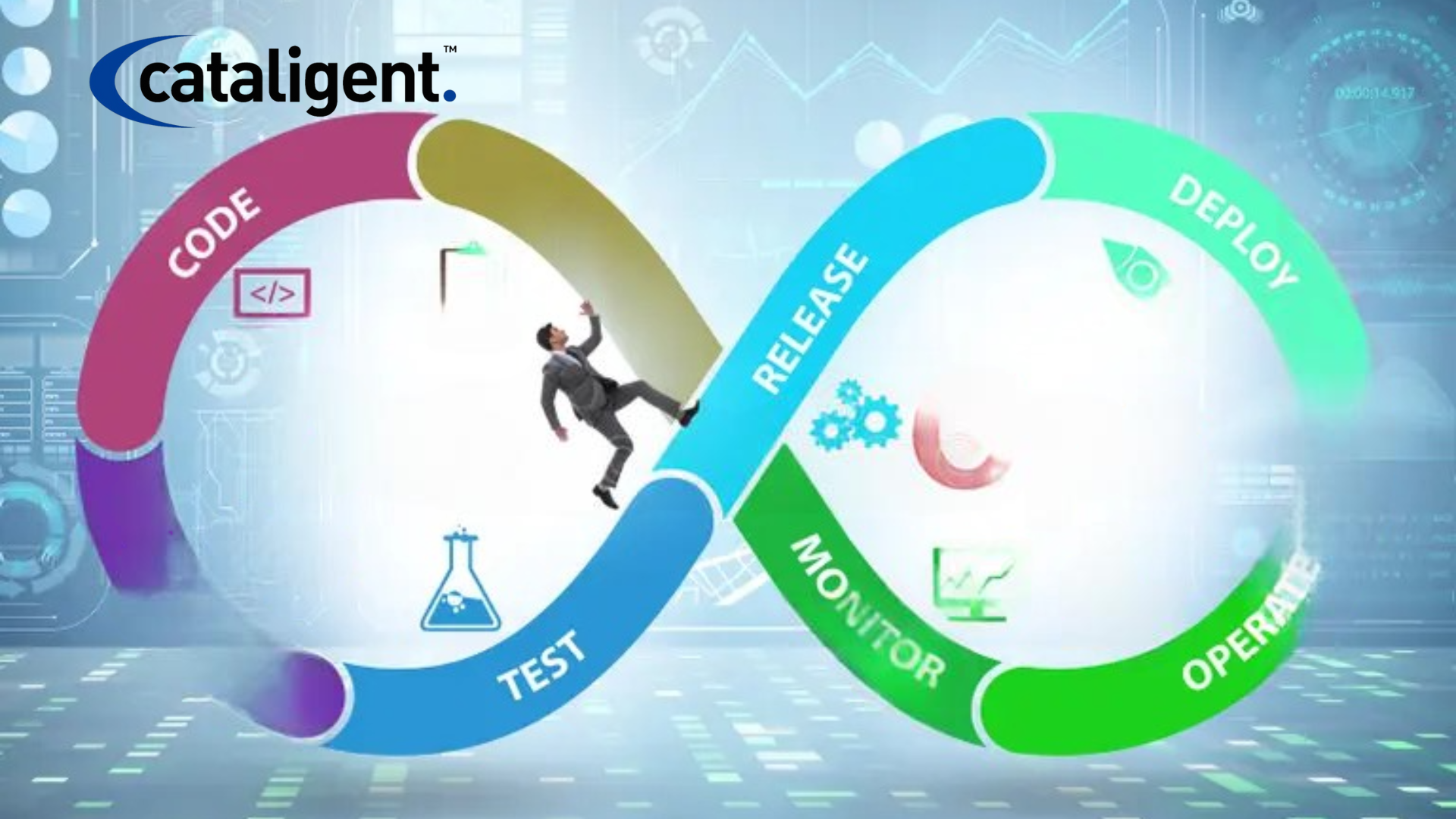
    A typical CI/CD pipeline consists of several stages:

    • Code: The initial stage where developers write and commit code to a version control system like Git.
    • Build: This stage compiles the code and creates executable artifacts, such as binaries or containers.
    • Test: Automated tests are executed to verify the code’s functionality and identify any defects. This can include unit tests, integration tests, end-to-end tests, and performance tests.
    • Release: The built artifacts are packaged and prepared for deployment.
    • Deploy: The release is deployed to various environments, such as development, staging, and production.
    • Monitor: The deployed application is monitored for performance and stability. Continuous Monitoring is crucial for identifying issues in production.

    Implementing CI/CD: Best Practices

    Successful CI/CD implementation requires careful planning and execution. Here are some best practices to consider:

    • Version Control: Use a robust version control system like Git to track code changes.
    • Automated Testing: Implement a comprehensive suite of automated tests to ensure code quality.
    • Build Automation: Automate the build process using tools like Jenkins, GitLab CI, or CircleCI.
    • Continuous Integration: Integrate code changes frequently and automatically trigger builds and tests.
    • Continuous Deployment: Automate the release and deployment process to minimize manual intervention.
    • Infrastructure as Code (IaC): Manage and provision infrastructure using code to ensure consistency and repeatability.
    • Containerization: Use container technologies like Docker to package applications and their dependencies for consistent deployment across environments.
    • Microservices Architecture: Break down applications into smaller, independent services to facilitate independent deployments.
    • Monitoring and Logging: Implement robust monitoring and logging to track application performance and identify issues.
    • Feedback Loops: Establish clear feedback loops between development, operations, and testing teams.
    • Security Integration: Incorporate security checks throughout the CI/CD pipeline to ensure application security. This is often referred to as DevSecOps.

    CI/CD Tools

    A wide range of tools are available to support CI/CD implementation:

    • Version Control: Git, GitLab, Bitbucket
    • CI/CD Platforms: Jenkins, GitLab CI, CircleCI, GitHub Actions, Azure DevOps, AWS CodePipeline
    • Build Tools: Maven, Gradle, npm, yarn
    • Testing Frameworks: JUnit, pytest, Selenium, Cypress
    • Containerization: Docker, Kubernetes
    • Infrastructure as Code: Terraform, Ansible, CloudFormation
    • Monitoring Tools: Prometheus, Grafana, Datadog, New Relic

    Challenges and Considerations

    Implementing CI/CD can present some challenges:

    • Resistance to Change: Teams may be resistant to adopting new processes and tools.
    • Complex Systems: Integrating CI/CD into complex legacy systems can be challenging.
    • Testing Complexity: Developing and maintaining a comprehensive suite of automated tests can be time-consuming.
    • Security Concerns: Ensuring application security throughout the CI/CD pipeline is crucial.

    Conclusion

    CI/CD is a powerful methodology that enables organizations to deliver high-quality software faster and more reliably. By automating the software delivery process, CI/CD empowers development teams to focus on innovation and deliver value to customers more quickly. While implementing CI/CD requires careful planning and execution, the benefits are significant, making it an essential practice for any organization looking to thrive in today’s competitive software landscape. By embracing DevOps principles and adopting CI/CD best practices, companies can unlock new levels of agility, efficiency, and customer satisfaction. The journey to continuous improvement is ongoing, and CI/CD provides the framework for achieving that goal.

  • Configuration Management in DevOps

    Configuration Management in DevOps

    Configuration management (CM) is a crucial aspect of DevOps, ensuring that IT infrastructure is maintained in a consistent and automated manner. It involves managing configurations, automating deployments, and maintaining system stability across various environments. By integrating configuration management into CI/CD pipelines, organizations can achieve greater efficiency, reliability, and scalability.

    What is Configuration Management?

    Configuration management is the process of handling system configurations, software versions, and environment settings to maintain consistency across different environments. It ensures that systems function as expected, reducing deployment errors and improving operational efficiency.

    Key Benefits of Configuration Management in DevOps:

    • Consistency: Ensures uniform configurations across all environments.
    • Automation: Reduces manual configuration errors.
    • Scalability: Simplifies managing infrastructure at scale.
    • Faster Deployments: Automates provisioning and configuration updates.
    • Enhanced Security: Enforces security policies and compliance requirements.

    Core Components of Configuration Management

    Configuration management consists of several key components:

    1. Infrastructure as Code (IaC)

    • Uses code to automate infrastructure provisioning.
    • Tools: Terraform, AWS CloudFormation, Pulumi.

    2. Configuration Automation

    • Manages software and system configurations automatically.
    • Tools: Ansible, Puppet, Chef, SaltStack.

    3. Version Control for Configurations

    • Stores configurations in version control for tracking and rollback.
    • Tools: Git, Subversion (SVN), Mercurial.

    4. State Management

    • Ensures systems remain in a desired state.
    • Tools: HashiCorp Consul, AWS Systems Manager, etcd.

    5. Monitoring and Compliance

    • Tracks system changes and ensures compliance.
    • Tools: Prometheus, Grafana, ELK Stack, Splunk.

    Configuration Management in CI/CD Pipelines

    Integrating configuration management with CI/CD ensures seamless application deployment and infrastructure provisioning.

    Steps in Configuration Management for CI/CD:

    1. Define Infrastructure as Code (IaC)
      • Store configurations in repositories (e.g., GitHub, GitLab).
    2. Automate Configuration Deployment
      • Use tools like Ansible, Puppet, or Chef to apply configurations automatically.
    3. Integrate with CI/CD Pipelines
      • Apply configurations during build and deployment stages.
    4. Test Configurations Continuously
      • Use automated testing to validate system configurations.
    5. Monitor and Log Configuration Changes
      • Implement logging and monitoring for tracking modifications.

    Best Practices for Configuration Management in DevOps

    To maximize efficiency and reliability, follow these best practices:

    1. Use Infrastructure as Code (IaC): Treat infrastructure like software code.
    2. Automate Everything: Eliminate manual configurations.
    3. Maintain a Centralized Configuration Repository: Store configurations in version control.
    4. Implement Role-Based Access Control (RBAC): Restrict unauthorized changes.
    5. Ensure Configuration Drift Detection: Continuously monitor for changes.
    6. Integrate with CI/CD Pipelines: Automate deployments efficiently.
    7. Regularly Audit and Review Configurations: Ensure compliance with security policies.

    Configuration Management Tools in DevOps

    Several tools are widely used for configuration management in DevOps workflows:

    • Ansible: Agentless automation tool for managing system configurations.
    • Puppet: Declarative configuration management for large-scale environments.
    • Chef: Infrastructure automation using code-defined configurations.
    • SaltStack: Scalable configuration management and orchestration.
    • Terraform: Infrastructure as Code tool for provisioning cloud environments.
    • AWS CloudFormation: Automates AWS infrastructure deployment.
    • Kubernetes ConfigMaps & Secrets: Manages configurations in containerized environments.

    Conclusion

    Configuration management is an essential component of DevOps, ensuring consistency, automation, and scalability in modern IT environments. By adopting best practices and leveraging the right tools, organizations can streamline infrastructure management, reduce deployment errors, and improve operational efficiency.

  • Infrastructure as Code (IaC) in DevOps

    Infrastructure as Code (IaC) in DevOps

    Infrastructure as Code (IaC) is a fundamental practice in DevOps that enables the provisioning and management of infrastructure through machine-readable scripts and code instead of manual processes. It ensures consistency, efficiency, and automation in deploying servers, networks, and storage resources. By leveraging IaC, organizations can rapidly scale their infrastructure while maintaining reliability and reducing human errors.

    What is Infrastructure as Code (IaC)?

    Infrastructure as Code (IaC) is a methodology where infrastructure configurations and provisioning are defined and managed using code rather than manual processes. This approach treats infrastructure like software, allowing teams to write, test, and deploy infrastructure configurations in a controlled and repeatable manner.

    IaC eliminates the need for manual infrastructure setup, which often leads to inconsistencies and inefficiencies. By adopting IaC, organizations can ensure that their infrastructure is version-controlled, easily reproducible, and aligned with best practices for DevOps automation.

    Importance of Infrastructure as Code in DevOps

    IaC plays a crucial role in DevOps workflows, enabling seamless automation, version control, and rapid deployments. Here’s why it is important:

    • Consistency and Standardization: IaC ensures uniform configurations across environments, reducing discrepancies between development, testing, and production environments.
    • Automation and Efficiency: Automates infrastructure provisioning, reducing manual errors and saving time.
    • Scalability: Supports large-scale infrastructure management, enabling faster scaling up or down as per business requirements.
    • Cost Reduction: Minimizes resource wastage by ensuring optimal allocation and usage.
    • Version Control and Reproducibility: Enables tracking of changes, rollback mechanisms, and reproducibility across environments.

    Key Principles of Infrastructure as Code

    To effectively implement IaC, organizations should follow these key principles:

    1. Declarative vs. Imperative Approach:
      • Declarative Approach: Defines the desired state of infrastructure, and automation tools ensure that the actual infrastructure matches the defined state (e.g., Terraform, CloudFormation).
      • Imperative Approach: Specifies step-by-step commands for configuring infrastructure (e.g., Ansible, Chef, Puppet).
    2. Idempotency: Ensures that applying the same infrastructure script multiple times results in the same state without unintended side effects.
    3. Modularization: Encourages reusability of infrastructure components to simplify maintenance and updates.
    4. Version Control: Infrastructure code should be stored in Git, GitHub, GitLab, or Bitbucket to enable tracking, auditing, and rollback.
    5. Security and Compliance: Enforces security policies, access control, and compliance requirements through code.

    Types of Infrastructure as Code

    1. Cloud-Native IaC

    Cloud-native IaC involves managing infrastructure using cloud service provider tools such as AWS CloudFormation, Azure Resource Manager (ARM), and Google Cloud Deployment Manager. These tools allow organizations to provision and manage resources directly within their respective cloud environments.

    2. Configuration Management IaC

    Configuration management tools like Ansible, Chef, and Puppet focus on automating software installation, updates, and system configurations across multiple servers.

    3. Provisioning Tools

    Provisioning tools such as Terraform and Pulumi allow teams to define infrastructure resources programmatically, ensuring repeatable and scalable deployments.

    How IaC Integrates with CI/CD Pipelines

    IaC is a key component of Continuous Integration and Continuous Deployment (CI/CD) pipelines, ensuring infrastructure is provisioned and configured automatically as part of the software delivery process. The integration follows these steps:

    1. Define Infrastructure Code: Store infrastructure definitions in repositories like Git.
    2. Trigger Automated Builds: CI/CD tools like Jenkins, GitLab CI/CD, and CircleCI automate infrastructure deployments.
    3. Test Infrastructure Changes: Automated testing ensures infrastructure stability before deployment.
    4. Deploy to Cloud or On-Premises: IaC tools apply configurations to the desired environment.
    5. Monitor and Update Infrastructure: Continuous monitoring tools like Prometheus, Grafana, and ELK ensure performance and compliance.

    Best Practices for Infrastructure as Code

    To maximize the benefits of IaC, organizations should follow these best practices:

    1. Use Version Control: Store infrastructure code in repositories like Git for tracking changes.
    2. Write Modular and Reusable Code: Structure configurations to allow easy updates and reuse.
    3. Automate Testing for Infrastructure Code: Implement unit and integration testing to validate infrastructure changes before deployment.
    4. Use Infrastructure State Management: Tools like Terraform maintain the current state of infrastructure, preventing drift.
    5. Ensure Security Best Practices: Apply role-based access control (RBAC), encryption, and compliance policies in infrastructure definitions.
    6. Leverage Cloud Agnostic Tools: Use tools like Terraform and Pulumi to avoid vendor lock-in.

    Infrastructure as Code Tools

    Several tools facilitate IaC implementation in DevOps workflows:

    • Terraform: A widely used IaC tool that allows multi-cloud provisioning.
    • AWS CloudFormation: Automates AWS infrastructure deployment using JSON or YAML templates.
    • Ansible: Automates server configuration and application deployment.
    • Chef: Provides configuration management and automation for large-scale environments.
    • Puppet: Automates infrastructure configurations and enforces policies.
    • Pulumi: Enables IaC using popular programming languages like Python, JavaScript, and Go.
    • SaltStack: Used for infrastructure automation and security management.

    Challenges in Implementing Infrastructure as Code

    While IaC offers numerous benefits, organizations often face challenges such as:

    • Complexity in Management: Managing large-scale infrastructure through code requires expertise.
    • Security Risks: Misconfigured infrastructure code can lead to security vulnerabilities.
    • State Management Issues: Keeping track of infrastructure states across environments can be difficult.
    • Learning Curve: Teams need to upskill in IaC tools and best practices.

    Conclusion

    Infrastructure as Code (IaC) is a core practice in DevOps, enabling organizations to automate, scale, and manage infrastructure efficiently. By adopting IaC tools, integrating with CI/CD pipelines, and following best practices, organizations can achieve faster deployments, improved consistency, and cost optimization. Despite the challenges, investing in IaC adoption is crucial for modern software development and cloud-based infrastructure management.

    Keywords: Infrastructure as Code, IaC, DevOps, Automation, CI/CD, Terraform, Ansible, AWS CloudFormation, Configuration Management, Cloud Infrastructure, Security, Infrastructure Provisioning

  • Key Components of the DevOps

    Key Components of the DevOps

    DevOps isn’t just a buzzword; it’s a transformative approach to software development and IT operations that’s revolutionizing how organizations build, deploy, and manage applications. It’s a philosophy, a culture, and a set of practices that emphasize collaboration, automation, and continuous improvement. This blog post dives deep into the key components of DevOps, exploring how they intertwine to create a powerful engine for delivering value to customers faster and more reliably.

    What is DevOps, Really?

    At its core, DevOps is about breaking down the traditional silos between development (Dev) and operations (Ops) teams. It fosters a culture of shared responsibility, where everyone works together throughout the entire software lifecycle, from initial design to production deployment and beyond. This collaborative approach, coupled with automation, enables organizations to release software more frequently, with higher quality, and with greater agility. It’s about embracing change, learning from failures, and constantly striving to improve.

    DevOps isn’t a single tool or technology; it’s a collection of principles, practices, and tools that work together. Here are the key components that form the foundation of a successful DevOps implementation:

    • Culture of Collaboration and Shared Responsibility:
      • Breaking down silos: DevOps encourages Dev and Ops teams to work together as a single unit, sharing goals, responsibilities, and even workspaces.
      • Shared ownership: Everyone is responsible for the entire software lifecycle, from development to deployment and maintenance.
      • Open communication: Transparent and frequent communication is crucial for fostering trust and collaboration.
      • Cross-functional teams: Teams are composed of members with diverse skills, allowing them to handle all aspects of the software lifecycle.
      • Empathy and respect: Building a culture of mutual respect and understanding between Dev and Ops teams is essential.
    • Automation: The Engine of DevOps:
      • Continuous Integration (CI): Automating the process of building, testing, and integrating code changes frequently. This helps identify and fix issues early in the development cycle.
        • Automated build processes
        • Automated testing (unit, integration, system)
        • Code quality checks
        • Version control integration
      • Continuous Delivery (CD): Automating the process of releasing software to different environments (e.g., development, testing, staging, production). This enables faster and more reliable releases.
        • Automated deployment pipelines
        • Infrastructure as Code (IaC)
        • Configuration management
        • Release orchestration
      • Infrastructure as Code (IaC): Managing and provisioning infrastructure through code, enabling automation and consistency. Tools like Terraform, Ansible, and CloudFormation are used.
      • Configuration Management: Automating the configuration and management of servers and other infrastructure components. Tools like Ansible, Chef, and Puppet are commonly used.
      • Automated Testing: Implementing comprehensive automated testing across all stages of the software lifecycle. This includes unit tests, integration tests, system tests, and performance tests.
      • Monitoring and Alerting: Automating the monitoring of applications and infrastructure, and setting up alerts for critical issues.
    • Continuous Improvement: The Heart of DevOps:
      • Feedback loops: Establishing mechanisms for gathering feedback from all stakeholders, including developers, operations teams, and customers.
      • Data-driven decision making: Using metrics and data to identify areas for improvement and track progress.
      • Experimentation and learning: Encouraging experimentation and learning from failures.
      • Kaizen: Embracing a culture of continuous improvement, where small, incremental changes are made regularly.
      • Post-mortem analysis: Conducting thorough post-mortem analyses of incidents to identify root causes and prevent future occurrences.
    • Monitoring and Logging: The Eyes and Ears of DevOps:
      • Centralized logging: Aggregating logs from all systems and applications into a central location for analysis.
      • Real-time monitoring: Monitoring the performance and health of applications and infrastructure in real time.
      • Alerting: Setting up alerts for critical issues, so that they can be addressed quickly.
      • Metrics and dashboards: Tracking key metrics and visualizing them in dashboards to gain insights into system performance.
      • APM (Application Performance Monitoring): Deeply monitoring application performance to identify bottlenecks and optimize user experience.
    • Version Control: The Foundation of Collaboration:
      • Git: A distributed version control system that allows developers to track changes to their code and collaborate effectively.
      • Branching and merging: Using branching and merging strategies to manage code changes and releases.
      • Code reviews: Conducting code reviews to ensure code quality and share knowledge.
    • Microservices Architecture (Often Associated, but not strictly required):
      • Small, independent services: Developing applications as a collection of small, independent services.
      • Increased agility: Microservices enable faster development and deployment of individual services.
      • Improved scalability: Individual services can be scaled independently based on demand.

    DevOps Tools: Enabling the Transformation:

    A wide range of tools support the various aspects of DevOps. Some popular categories and examples include:

    • Version Control: Git, GitLab, Bitbucket
    • CI/CD: Jenkins, GitLab CI/CD, CircleCI, Azure DevOps
    • Infrastructure as Code: Terraform, Ansible, CloudFormation
    • Configuration Management: Ansible, Chef, Puppet
    • Containerization: Docker, Kubernetes
    • Monitoring and Logging: Prometheus, Grafana, ELK stack (Elasticsearch, Logstash, Kibana), Splunk
    • Testing: Selenium, JUnit, pytest
    • Collaboration: Jira, Confluence, Slack

    Benefits of Embracing DevOps:

    • Faster time to market: DevOps enables organizations to release software more frequently and quickly.
    • Improved software quality: Continuous integration and testing help identify and fix issues early in the development cycle.
    • Increased efficiency: Automation reduces manual effort and streamlines processes.
    • Reduced costs: Automation and improved efficiency can lead to significant cost savings.
    • Enhanced collaboration: DevOps fosters a culture of collaboration and shared responsibility.
    • Increased customer satisfaction: Faster releases and higher quality software lead to happier customers.

    Conclusion:

    DevOps is more than just a set of tools; it’s a cultural shift that requires a commitment to collaboration, automation, and continuous improvement. By embracing the key components outlined in this blog post, organizations can unlock the full potential of DevOps and transform the way they build, deploy, and manage software. It’s a journey, not a destination, and the rewards are well worth the effort. By focusing on the people, processes, and tools, organizations can create a high-performing DevOps culture that delivers exceptional value to their customers.

  • ITIL Certification

    ITIL Certification

    ITIL (Information Technology Infrastructure Library) is the globally recognized framework for IT Service Management (ITSM). ITIL helps organizations streamline IT processes, improve service quality, and align IT services with business objectives. One of the key aspects of ITIL is its certification program, which provides professionals with the necessary skills and credentials to implement ITIL best practices effectively.

    In this blog, we will explore the ITIL certification path, the benefits of obtaining an ITIL certification, and details about each certification level.

    Benefits of ITIL Certification

    1. Enhanced Career Opportunities

    ITIL certification is highly valued in the IT industry, providing professionals with greater job prospects. IT service management roles often require ITIL expertise, making certification a key differentiator for job seekers.

    2. Increased Earning Potential

    Certified ITIL professionals earn higher salaries than their non-certified counterparts. Organizations recognize the value ITIL-certified employees bring in optimizing IT services and reducing costs.

    3. Improved IT Service Management Skills

    ITIL training enhances an individual’s ability to manage IT services effectively, leading to improved efficiency, reduced downtime, and better alignment with business goals.

    4. Global Recognition

    ITIL is a globally recognized framework, making certification beneficial for professionals working in multinational organizations or seeking international job opportunities.

    5. Business and IT Alignment

    ITIL-certified professionals understand how to align IT services with business objectives, ensuring that IT contributes to overall business success.


    ITIL Certification Levels

    1. ITIL Foundation Certification

    Who Should Take It?

    • Beginners in IT service management
    • IT professionals looking to understand ITIL basics

    Overview:

    • Introduction to ITIL framework, key concepts, and principles
    • Covers the Service Value System (SVS) and Service Value Chain (SVC)
    • Basic understanding of ITIL 4 practices

    Benefits:

    • Establishes foundational ITIL knowledge
    • Helps professionals move to advanced certifications

    2. ITIL 4 Managing Professional (MP)

    Who Should Take It?

    • IT professionals managing IT operations, projects, and teams
    • ITSM practitioners responsible for delivering IT services

    Modules:

    1. Create, Deliver, and Support (CDS) – Covers core ITIL practices for service delivery.
    2. Drive Stakeholder Value (DSV) – Focuses on stakeholder engagement and customer experience.
    3. High Velocity IT (HVIT) – Explores digital transformation and high-speed IT service management.
    4. Direct, Plan, and Improve (DPI) – Covers governance, strategy, and continual improvement.

    Benefits:

    • Practical knowledge for managing IT services
    • Helps IT professionals apply ITIL principles in real-world scenarios

    3. ITIL 4 Strategic Leader (SL)

    Who Should Take It?

    • IT leaders, executives, and decision-makers
    • Professionals involved in digital transformation and business strategy

    Modules:

    1. Direct, Plan, and Improve (DPI) – Also part of the Managing Professional certification.
    2. Digital and IT Strategy (DITS) – Focuses on IT strategy, innovation, and business alignment.

    Benefits:

    • Helps senior professionals drive IT strategy
    • Supports digital transformation initiatives

    4. ITIL 4 Extension Modules

    These modules focus on emerging technologies and industry-specific IT service management.

    • ITIL 4 Specialist: Sustainability in Digital & IT – Covers sustainable IT practices.
    • ITIL 4 Specialist: Acquiring & Managing Cloud Services – Focuses on cloud adoption and management.
    • ITIL 4 Specialist: IT Asset Management – Deals with optimizing IT asset usage.
    • ITIL 4 Specialist: Business Relationship Management – Covers relationship management strategies.

    Benefits:

    • Specialization in niche areas of IT service management
    • Helps professionals adapt to industry trends

    5. ITIL Master Certification

    Who Should Take It?

    • Experienced ITIL professionals and ITSM experts

    Requirements:

    • Completion of ITIL 4 Managing Professional (MP) or ITIL 4 Strategic Leader (SL) certifications
    • Minimum five years of IT service management experience
    • Submission of a real-world project showcasing ITIL expertise

    Benefits:

    • Highest level of ITIL certification
    • Recognizes deep expertise in IT service management

    How to Get ITIL Certified

    Step 1: Choose the Right Certification Level

    Decide which ITIL certification aligns with your career goals. Beginners should start with ITIL Foundation, while experienced professionals can pursue advanced levels.

    Step 2: Enroll in an Accredited Training Program

    ITIL certification requires training from accredited providers. Many training courses are available online and in classroom settings.

    Step 3: Study the ITIL Framework

    Understanding ITIL concepts, processes, and best practices is crucial. Training materials, ITIL books, and online resources can help.

    Step 4: Take the Exam

    Each ITIL certification requires passing an exam. The exams consist of multiple-choice questions, scenario-based questions, and practical assessments (for advanced levels).

    Step 5: Obtain Certification and Continue Learning

    Once certified, professionals can advance their ITIL knowledge by pursuing higher-level certifications or extension modules.


    Conclusion

    ITIL certification is a valuable investment for IT professionals looking to advance their careers in IT service management. With different certification levels, ITIL provides a structured learning path for both beginners and experienced professionals.

    From foundational knowledge to strategic leadership, ITIL certifications help individuals and organizations optimize IT services, align IT with business goals, and improve service quality. Whether you’re an aspiring IT professional or a seasoned expert, ITIL certification can significantly enhance your career prospects and organizational impact.

    By understanding the certification levels, benefits, and study process, professionals can embark on a successful journey toward ITIL mastery and excellence in IT service management.